
Help & Support
Find the answers you need fast!
How to take and submit a meter reading
Online customers can submit meter readings through their online account. We will send you an email when it’s time to provide a meter reading.
Here’s how to read your meter:
There are a few types of meters but they are generally read in the same way.
Simply read the numbers from left to right ignoring any numbers in red.
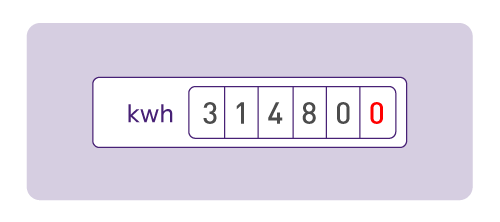
If you have a different meter and are not sure how to take the reading, simply take a photo of the meter box and email it to us at [email protected]. Please include your name and account number in the email.
Here's how to submit electricity and gas readings:
1.
You can easily submit your meter reading through your online account.
Before we create your next bill, we’ll send you an email asking for a meter reading. Once you receive this email, simply log in to your online account. You’ll see a prompt on your dashboard letting you know it’s time to submit your reading. Just go to the Meter Readings page and enter your details.
Please note: When you log in, you may find that the Network Operator has already provided a reading for you. If this happens, you’ll see a message confirming that a reading has been submitted on your behalf.
2.
You can also submit meter readings to the relevant network.
Electricity meter read? Simply text your electricity meter reading directly to ESB Networks at 0879609223.
Please send your reading in the format of your 11-digit MPRN followed by a space and then your meter reading - e.g. 10009998888 31480
If you have a smart electricity meter with good connectivity, you are not required to submit meter readings. These will be sent automatically to ESB Networks.
Gas meter read? You can submit gas readings directly to Gas Networks Ireland by calling 1800 427 732.
Your feedback is important to us.
We appreciate your feedback, as it plays a key role in helping us enhance our services for our customers.
